2. 제목 만드는 법
1) 아마존 검색창에 내 책과 같은 주제를 영어 키워드로 검색합니다.
한국어 교재라면 "Korean language"로 검색합니다.
2) 첫 번째 페이지에 뜬 책 상위 10권의 제목을 전부 복사합니다.
Sponsored (광고)라는 글자가 들어가지 않은 책의 제목만 복사합니다. 베스트셀러들은 광고도 함께 하는 경우가 많기 때문에 Sponsored 글자가 붙었지만, 동일한 책이 Sponsored 표시 없이 상위에 있는 경우는 그 책의 제목도 복사합니다.
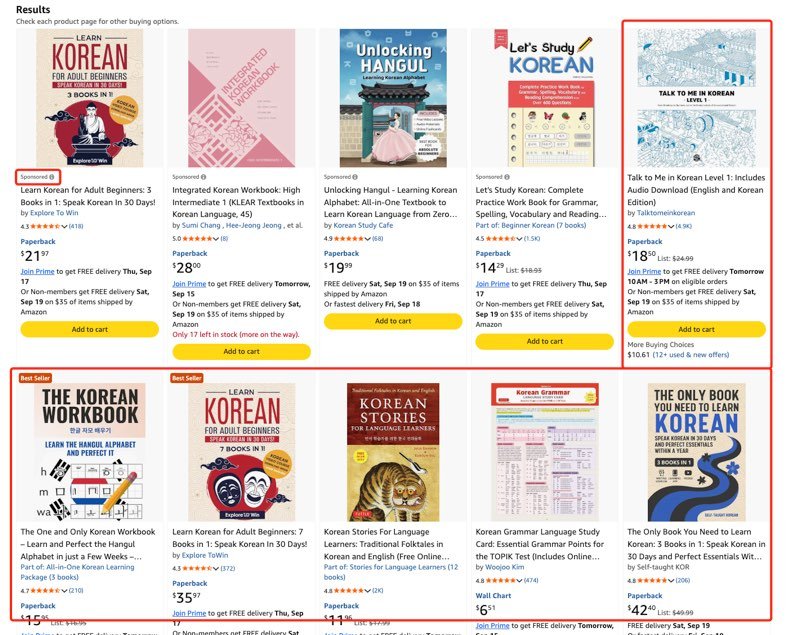
3) 아래 프롬프트에 복사한 제목들을 붙여넣습니다.
AI가 베스트셀러의 제목에 들어간 단어의 빈도를 분석하고 후보 제목을 만들어줍니다.
I am publishing a book on Amazon KDP about 내 책의 주제 — 한글로 써도 됩니다.
Below are the titles of the top 10 bestselling books in my niche on Amazon. Analyze them and do the following:
Step 1: Keyword Frequency Analysis
List every meaningful word that appears 2 or more times across these titles. Exclude articles, prepositions, and conjunctions (a, the, and, for, in, of, to, with, etc.). Sort by frequency, highest first.
Step 2: Title Generation
Using the top keywords from Step 1, create 5 natural-sounding book titles with subtitles. Each title + subtitle must be under 200 characters. The titles must sound like they belong on Amazon's bestseller list — professional, clear, and keyword-rich without being spammy.
Bestseller Titles:
(여기에 아마존에서 복사한 10개의 제목을 붙여넣기)
한국어 교재를 아마존에서 "Korean language"로 검색해서 상위 10권의 제목을 복사한 뒤 프롬프트를 실행하면, 다음과 같은 결과를 얻습니다.
Step 1 결과 (빈도 분석):
korean: 14, learn: 7, complete: 3, beginners: 3, grammar: 3, workbook: 3, read: 3, write: 3, easy: 3, guide: 3 ...
Step 2 결과 (제목):
"Complete Korean Grammar Guide: An Easy Workbook for Beginners to Learn, Read, and Write"
Tip: 왜 실제 베스트셀러 제목을 복사해서 붙여넣는가
- AI에게 그냥 제목을 만들어 달라고 하지 않고 실제 베스트셀러 제목을 복사해서 넣는 이유가 있습니다. AI는 아마존의 실시간 검색 결과를 볼 수 없습니다. AI가 스스로 만드는 제목은 학습 데이터에 기반한 추측이지만, 아마존 베스트셀러 제목에 실제로 들어간 단어는 지금 아마존에서 고객들이 책을 검색할 때 쓰는 단어입니다. 이 한 단계의 수고가 결과의 정확도를 크게 높입니다.
- 아마존 출판 시 제목과 부제목의 글자 수는 합쳐서 200자 이하여야 합니다.
- AI가 만들어준 제목 5개 중에서 고르기 어려우면, 각 제목을 아마존 검색창에 넣어보십시오. 검색 결과가 내 책과 비슷한 주제의 책들로 나오는 제목이 가장 적절한 제목입니다.